
Looking for an affordable laptop that handles daily tasks without emptying your wallet? After a spin with the Lenovo IdeaPad 3i, I can say it’s a budget machine that gets the basics right for most folks.
It runs on an Intel Core i3 processor and comes with 12GB of memory—plenty for browsing, writing, and juggling a few apps. The 15.6-inch touchscreen is responsive, but don’t expect razor-sharp visuals; it’s standard HD, not full HD.
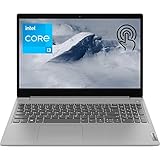
- 【High Speed RAM And Enormous Space】12GB DDR4 RAM to smoothly run multiple applications and browser tabs all at once; 256GB PCIe M.2 Solid State Drive allows to fast bootup and data transfer
- 【Processor】Intel Core i3-1115G4 3.00 GHz 2 Cores Processor (6MB Cache, up to 4.10 GHz), Intel UHD Graphics
- 【Dazzling Display】15.6" HD touchscreen display with narrow bezels

A 256GB SSD boots Windows 11 in a flash and offers enough storage for most needs. Wi-Fi 6 keeps things speedy online, and the webcam’s got a privacy shutter, which is a relief for anyone who’s ever slapped a sticker over their camera.
Still, I ran into a few drawbacks. The display isn’t as crisp as I’d like, and you only get three USB ports. Build quality? It’s fine for the price, but don’t expect anything fancy.
Long-term reliability is a bit of a toss-up. Some folks love the lightweight feel and quick performance for simple stuff, but others have run into hardware hiccups after a while.
Click here to purchase the Lenovo IdeaPad 3i and get reliable computing performance today!
Overview Of The LENOVO IdeaPad 3i Laptop
This laptop’s all about value—Intel Core i3-1115G4, 12GB DDR4 RAM, and a 256GB PCIe SSD. Boot times are snappy, and day-to-day work feels smooth, though if you’re hoarding media, space might run out fast.
Key Highlights:
- Display: 15.6″ HD touchscreen (1366×768)
- Performance: Intel i3 processor with 12GB RAM
- Storage: 256GB PCIe SSD
- Connectivity: Wi-Fi 6, Bluetooth 5.1, HDMI
The touchscreen is handy for quick navigation, but HD resolution just doesn’t compare to FHD. Still, juggling browser tabs and docs? No sweat.
At 4.07 pounds, it’s not a featherweight, but it won’t drag you down. The keyboard’s comfortable enough, though I’ve seen reports of the trackpad acting up after a few months.
You’ve got two USB 3.0 ports and one USB 2.0—might need a hub if you use a lot of gadgets. Windows 11 Home runs just fine here.
Powerful Performance With Intel Core i3 Processor
In everyday use, the Core i3-1115G4 keeps things moving for web surfing, documents, and a bit of multitasking. It’s a dual-core chip at 3 GHz, and it doesn’t really choke unless you throw a lot at it.
Performance highlights:
- Smooth with office apps and streaming
- Fast boot thanks to the SSD
- Multiple tabs? No big deal
Paired with 12GB RAM, it’s pretty solid for students or anyone not pushing the limits. Video calls and light photo edits run without drama.
But, if you’re hoping to run heavy software or game seriously, you’ll hit a wall. The integrated Intel UHD Graphics just isn’t up for much beyond casual stuff.
For basic home or office work, though, it’s plenty.
Smooth Multitasking And Generous Storage
The 12GB RAM really helps when you’re running several apps. Even with a bunch of tabs and programs open, it stayed responsive—though if you really push it, you’ll notice some lag.
Storage Performance:
- Boots in under 15 seconds
- Fast file transfers and app launches
- 256GB is decent, but heavy downloaders might fill it up
The PCIe SSD makes the whole system feel zippy. Jumping between apps and opening big files didn’t slow things down.
For everyday stuff—streaming, docs, a bit of photo work—it’s smooth. If you’re a power user, you’ll eventually hit limits, but for most, it’s enough.
Windows 11 does eat up a chunk of storage, so you might want to lean on the cloud or plug in an external drive if you’ve got a lot of files.
Intuitive 15.6″ Touchscreen Display
Touch is a nice perk here. The touchscreen is accurate, whether you’re tapping, swiping, or scrolling. It’s a natural fit if you’re used to tablets or phones.
Screen Quality
- Resolution: 1366 x 768 HD
- Size: 15.6 inches
- Bezels: Slim, so it looks modern
Text is crisp enough for day-to-day stuff, but HD feels cramped if you’re working with detailed graphics or lots of windows.
The touchscreen makes it easy to skip the trackpad for casual browsing. Sometimes you might bump it by accident while typing, though—not a huge deal, but worth mentioning.
Colors and brightness are fine indoors, but if you’re outside or in strong sunlight, it’s a struggle. It’s not a display that’ll wow you, but it gets the job done.
Modern Connectivity And Ports
Ports are pretty standard—nothing flashy, but enough for daily use. You get two USB 3.0 ports, one USB 2.0, and an HDMI for plugging into a monitor or TV.
Key Connection Features:
- USB Ports: 2x USB 3.0, 1x USB 2.0
- Display Output: HDMI port
- Wireless: Wi-Fi 6, Bluetooth
Wi-Fi 6 is a nice touch—if you’ve got a compatible router, you’ll notice the speed bump. The HDMI port makes dual screens a breeze.
You can plug in a mouse, external drive, and still have a port left for whatever else. The mix of USB 3.0 and 2.0 is handy if you’ve got older gear.
No USB-C, though, which is a letdown if you’re after the latest connections. Still, for most, it covers the basics.
Enhanced User Experience With Windows 11 Home
Windows 11 brings a cleaner interface and a more organized Start menu. The design feels a bit more pulled together, and multitasking is easier with the new window snapping.
You can arrange apps and browser windows quickly, which is pretty useful on a 15.6-inch screen. With 12GB RAM, you can run a bunch of things at once without much slowdown.
Key Windows 11 Benefits:
- Sleek, updated look
- Better window management
- Multitasking feels easier
- Security features are improved
Setting up, though, is a bit of a slog. Between updates, BIOS tweaks, and uninstalling pre-loaded junk, you could lose a good chunk of your day.
Touchscreen and Windows 11 play well together—the gestures and touch controls feel natural.
Security And Privacy Features
Security’s mostly handled by Windows 11 Home—there’s no fancy hardware here.
Windows 11 includes Windows Defender Antivirus and Microsoft Defender SmartScreen. You get automatic updates and a basic firewall, but no fingerprint reader or facial recognition.
The webcam doesn’t have a physical shutter, so if you’re privacy-conscious, you’ll want a cover or to keep it disabled. On the upside, Wi-Fi 6 supports WPA3 for more secure connections.
Key Security Elements:
- Built-in antivirus and firewall
- Automatic updates
- WPA3 Wi-Fi encryption
- No biometric login options
It’s enough for home or student use, but if you’re extra cautious, you might want to add extra security tools.
Lightweight Design And Portability
At 4.07 pounds, the IdeaPad 3i is easy enough to lug around—definitely lighter than a lot of 15.6-inch laptops. It measures 14.26 x 9.98 x 0.78 inches, so it slides into most bags without fuss.
Weight Comparison:
- IdeaPad 3i: 4.07 lbs
- Typical 15.6″ laptop: 4.5-5.5 lbs
It’s not ultra-light, but I didn’t mind carrying it to a coffee shop or class. The weight feels balanced, so it won’t tip over if you’re working on your lap.
The platinum grey finish looks sharp but picks up fingerprints quickly—kind of annoying if you like things clean. Still, build quality is solid enough for daily use.
Pros and Cons
After some hands-on time, here’s what stood out—and what didn’t.
Pros
12GB RAM is the star here. You can run lots of tabs, Office, and streaming without hiccups. The 256GB SSD means fast boots and quick file access.
Touchscreen navigation is genuinely useful. Swiping through docs or sites feels natural, and it’s a nice bonus for the price.
Wi-Fi 6 keeps connections speedy and stable, even in busy networks. The ports you get (USB Type-A and HDMI) cover most needs.
Windows 11 runs smoothly, and the Core i3-1115G4 is fine for the basics—web, docs, streaming.
Cons
The HD screen is underwhelming in 2025. On a big display, you’ll notice the lack of sharpness.
Port selection is a bit stingy. Two USB-A ports on opposite sides means you’ll probably need a hub if you have a bunch of devices.
Durability is a question mark. Some users have had trackpad or USB port issues after a few months, and the camera isn’t great—grainy video, sometimes with weird artifacts.
Initial setup can drag on, thanks to updates and bloatware removal.
Graphics are basic—don’t expect to game or run demanding creative software.
Customer Reviews
Most folks say the IdeaPad 3i delivers good performance for the price. The 12GB RAM gets lots of love for keeping things smooth when multitasking.
What People Like:
- Fast boots with the SSD
- Touchscreen is responsive
- Handles work and school apps well
- Good value for what you get
People are happy with how it juggles multiple tabs and apps. Wi-Fi 6 is a hit too—better speeds are always welcome.
Common Complaints:
- HD display isn’t sharp enough for some
- Build feels plasticky
- Battery life doesn’t impress with heavy use
The Core i3 gets mixed reviews—fine for light tasks, not so much for power users. Overall, if you know you’re buying a budget laptop for basic stuff, most buyers seem satisfied.
Frequently Asked Questions
After spending some time with this budget-friendly laptop, a handful of questions keep popping up from folks considering it. The IdeaPad 3i definitely fills a particular spot in the laptop market, and knowing what it can (and can’t) do helps keep expectations in check.
What are the specifications of the Lenovo IdeaPad Slim 3i?
The IdeaPad 3i comes with an Intel Core i3-1115G4 processor, which starts at 3.00 GHz and can boost up to 4.10 GHz when pushed.
Key Specifications:
- Display: 15.6-inch HD touchscreen (1366 x 768 resolution)
- Memory: 12GB DDR4 RAM
- Storage: 256GB PCIe SSD
- Graphics: Intel UHD Graphics (integrated)
- Weight: 4.07 pounds
- Dimensions: 14.26 x 9.98 x 0.78 inches
You’ve got Wi-Fi 6, Bluetooth 5.1, two USB 3.0 ports, one USB 2.0 port, HDMI, and a headphone jack. It runs Windows 11 Home and even has a built-in webcam with a privacy shutter, which is a nice touch.
How does the battery life of the Lenovo IdeaPad Slim 3i compare to other laptops in its range?
Battery life is, well, about what you’d expect for the price. In real-world use—browsing, emails, documents—it usually lands somewhere between 5 and 7 hours.
Of course, your mileage will vary depending on how bright you set the screen or how many tabs you’ve got open. The touchscreen does draw more juice than non-touch models, which is worth keeping in mind.
So, compared to other budget laptops, it’s right in the middle. You’ll see better longevity from premium ultrabooks, but those come with a much higher price tag.
What are the performance capabilities of the Lenovo IdeaPad 3i with an i5 processor?
This particular model runs on an i3-1115G4, not an i5—just to clear that up. The i3 is fine for typical stuff: web browsing, email, Office, and so on. The 12GB RAM helps more than you’d think, especially if you’re the type to keep a dozen tabs open.
Performance Strengths:
- Smooth enough on Windows 11
- Good for office work and light multitasking
- Handles basic photo edits
- No trouble streaming video
Gaming? Not really. The integrated Intel UHD Graphics are only up for older or very undemanding games. Don’t expect to run anything modern or graphics-heavy.
What are commonly reported issues or downsides of the Lenovo IdeaPad 3 laptops?
A few gripes come up over and over. The screen resolution (1366 x 768) feels pretty outdated, especially with so many competitors offering Full HD these days.
Common Issues:
- Only three USB ports, which can be limiting
- Trackpad can get flaky after some time
- USB ports themselves may not hold up well
- The display just doesn’t look as sharp as it could
- Built-in speakers sound a bit tinny
Some folks have run into hardware hiccups after a year or two, mainly with the USB ports and trackpad. The plastic build doesn’t feel especially sturdy—definitely not premium. And customer service? Mixed bag. Some get help fast, others end up frustrated chasing warranty claims.
How does the Lenovo IdeaPad 3i Chromebook performance differ from the Windows version?
There’s a pretty big difference between the Windows and Chromebook versions of the IdeaPad 3i. The Windows 11 model lets you run full desktop apps and work offline, which is a big deal for certain users.
Windows Version Advantages:
- Runs all the standard Windows programs
- Has more local storage (256GB SSD)
- Completely usable without an internet connection
- More flexible for software needs
Chromebooks, on the other hand, tend to last longer on a charge but need Wi-Fi for most things. They’re a little snappier for web-based tasks, but if you need to install regular software or store a lot locally, Windows is the safer bet. It’s all about which compromises you’re willing to make.
Which year model of the Lenovo IdeaPad 3i is considered the best in terms of features and value?
This model hit the market in August 2020, marking the early days of the IdeaPad 3i lineup. The 2020-2021 versions come in at a pretty good price now, but you won’t find the latest bells and whistles.
2020 Model Considerations:
- Proven hardware reliability
- Lower prices these days, thanks to age
- Wi-Fi 6 support—pretty ahead of its time back then
- Works with Windows 11
Later models do bring better processors and sometimes nicer displays, but you’ll pay extra for those upgrades. The 2020 version covers the basics well enough for everyday tasks, especially if you’re watching your budget.
That said, if you care a lot about screen quality, the HD resolution might feel underwhelming in 2025. Worth thinking about before you pull the trigger.


