
Some folks just want a phone that makes calls, sends texts, and doesn’t try to run their life with a thousand notifications. The TCL Flip 2 is one of those rare, simple devices—compact, chunky buttons, and an interface that actually makes sense if you’re not glued to your phone all day. One hitch: it’s locked to Tracfone, so you’re stuck with their plans.
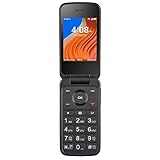
- 2.8" Internal Screen; 1.44" External Preview Display; 1.5 GHz Quad-Core Processor; Internal Memory 16GB; 1GB RAM; 4G LTE
- Wi-Fi Capable; Bluetooth Capable; Internet Access; 2MP Camera & Video Recorder; Externa Caller ID; Supports Micro SD memory card up to 128GB (not included)
- BIG BUTTONS and large, legible numbers and make dialing effortless. POWERFUL SPEAKER ensures every conversation will be loud and clear.

People mention the audio is clear and the size is just right for pockets or bags. It’s not all sunshine—some have griped about spotty connectivity and a setup guide that’s, well, not very helpful. Battery life and durability seem about what you’d expect for a basic flip.
Overview of the Tracfone TCL Flip 2
This little flip phone is all about basic communication and keeping things simple. Big physical buttons make dialing less of a chore, and you get a small external screen so you can check who’s calling before flipping it open.
You get 4G LTE, Wi-Fi, Bluetooth—enough to get by, but not so much you’ll get lost in menus. The camera is there for quick snaps, but don’t expect anything Instagram-worthy.
Pros:
- Simple, user-friendly design
- Clear audio with a loud speaker
- Pocket-friendly size
Cons:
- Locked to Tracfone’s network
- Limited camera performance
- No headphone jack
It’s dependable for calls and texts, but if you’re after apps and fancy features, this isn’t your match.
Sleek and Portable Design
It’s small, folds in half, and slips into a pocket or purse without much fuss. Rounded corners feel nice in your hand, and the weight’s light enough that you might forget it’s there.
The flip design keeps the screen safe from scratches, which is a relief. Downside? The glossy finish picks up fingerprints, so you’ll probably be wiping it down now and then.
Pros:
- Slim profile for easy storage
- Protective clamshell design
Cons:
- Glossy surface attracts smudges
- Limited color choice
User-Friendly Keypad and Interface
Big, bold buttons make dialing and texting less of a headache, especially if your eyesight or dexterity isn’t what it used to be. The keys have a satisfying click, and the layout is straightforward.
You can see who’s calling on the outside screen, and inside, menus are simple and not overloaded. There’s a directional pad and a few dedicated keys, so you’re not hunting through endless options.
Some folks say the setup instructions could be a lot clearer. But once you get past that, using it is a breeze.
Performance and Battery Life
For calls and texts, it’s quick—no real lag. You’re not going to multitask much with this hardware, but that’s kind of the point, right? A few users have run into dropped calls or the phone shutting off out of nowhere, which could be a dealbreaker if you need total reliability.
Battery life is solid for light use. You’ll get about 9 hours of talk time, and it can sit on standby for days. If you lean on Bluetooth or Wi-Fi a lot, though, expect to charge more often.
Pros:
- Steady performance for core phone functions
- Long standby time
Cons:
- Limited capability for demanding tasks
- Occasional reports of unexpected shutdowns
Camera and Multimedia Capabilities
The camera is… basic. It’ll snap a quick photo or video, but only in good light and don’t expect much detail. There’s no selfie camera, so video calling isn’t happening.
For music or videos, you get a loud speaker that does the job, and you can connect Bluetooth headphones. No headphone jack, though, which is annoying if you still have wired earbuds.
Pros:
- Simple camera for casual use
- Loud and clear speaker output
Cons:
- Limited image quality
- No front-facing camera
- No standard headphone jack
Connectivity and Network Features
You’ve got 4G LTE for calls and some light web stuff. Bluetooth is there for pairing with accessories, and Wi-Fi is handy when you’re at home or work. USB lets you charge or transfer files.
No headphone jack, which is a pain, but there’s built-in GPS if you need directions.
Pros:
- Reliable 4G network support
- Wi‑Fi and Bluetooth for flexible connectivity
- GPS for navigation
Cons:
- No headphone jack for wired listening
Affordable Plans and No Contracts
If you hate contracts, this phone’s for you. It works with prepaid plans—no long-term commitment, just pay as you go.
Plans are cheap, which is great if you don’t use a ton of data. But if you do, you might find the options a bit limiting compared to what smartphones offer.
Pros:
- No long-term contracts
- Low entry-level monthly price
Cons:
- Limited data allowances on lower-cost plans
- Locked to Tracfone’s network
Accessibility for Seniors and Beginners
The controls are clear and menus are stripped-down, so it’s not intimidating for newbies or seniors. Big, raised buttons with bold numbers help avoid wrong numbers, and you can see caller ID on the outside without opening it.
The speaker’s loud enough for most, which is good if your hearing isn’t perfect. The screen inside is on the small side, so reading texts might be tough for some.
Pros:
- Large, tactile keypad
- Simple navigation menus
- Clear audio output
Cons:
- Limited screen size for reading
- Locked to a single carrier, reducing flexibility
Pros and Cons
When you stack it all up, this flip phone is practical, with a few quirks you’ll want to know about.
Pros
- Simple and easy to use — Big buttons, clear display, no confusion.
- Good call clarity — The speaker’s loud and conversations come through cleanly.
- Compact and durable — The flip keeps the screen and keys safe.
- Basic connectivity options — Wi-Fi, Bluetooth, and 4G LTE cover the basics.
- Expandable storage — Pop in a microSD if you need more space.
| Strength | Why It Matters |
|---|---|
| Big buttons | Easier for those with vision or dexterity issues |
| Loud speaker | Improves call audibility in noisy environments |
| Flip design | Reduces accidental dialing and screen damage |
Cons
- Locked to one carrier — Only works with Tracfone, so you can’t just swap SIMs.
- Basic camera — The 2MP shooter is nothing special.
- Occasional performance issues — Some users have seen shutdowns or dropped calls.
- Sparse setup guidance — The manual is thin, so you might need to tinker or call support.
| Limitation | Potential Impact |
|---|---|
| Carrier lock | No option to switch networks without replacing the device |
| Low camera resolution | Not ideal for frequent photo use |
| Setup challenges | May be harder for less tech-savvy users |
Customer Reviews
Buyers are mostly positive, though not without some complaints. The simple design is a big win, especially for folks who just want calls and texts. A lot of people use it as a backup or for someone who doesn’t need a smartphone.
People like:
- Ease of use for calls and speed dialing
- Affordable service plans
- Durable build for daily use
But there are downsides:
- Call connection problems or dropped calls now and then
- Setup instructions that leave a lot to be desired
- Some mention the phone shutting off unexpectedly
Frequently Asked Questions
How does the TCL Flip 2 performance compare to other flip phones on the market?
For basic stuff—calls, texts, a bit of web—it’s responsive. The quad-core processor and 1GB RAM put it somewhere in the middle of the pack for feature phones. Not the fastest, but plenty for everyday needs.
Is the TCL Flip 2 compatible with 4G networks?
Yep, it’s got 4G LTE. That means clearer calls and faster data than the old 3G models. Just remember, it’s locked to Tracfone—no switching carriers.
What are the main features and specifications of the TCL Flip 2?
You get a small internal screen, a little preview display on the outside, a 2MP camera, and expandable storage up to 128GB.
Key points:
- Operating System: Android 11 (customized for feature phone use)
- Battery Life: Up to about 9 hours talk time
- Connectivity: Wi-Fi, Bluetooth, GPS
- Design: Big buttons, loud speaker
Can you download and use apps on the TCL Flip 2, and if so, which ones?
Not really. It’s a feature phone, so you’re limited to basic pre-installed apps for calls, texts, maybe a calculator or calendar. Don’t expect the full Android app store.
What improvements have been made in the TCL Flip 2 compared to its predecessor?
It’s got a newer OS, better 4G LTE support, and a bit more processing power than older TCL flips. Wi-Fi and expandable storage are nice touches that you didn’t always get before.
Where can I find a detailed user manual for the TCL Flip 2?
You’ll find the complete user manual over on Tracfone’s official support site. Another spot to check is the manufacturer’s page—just look for model number T408DL. The manual walks you through setup, features, and some troubleshooting, though sometimes I wish they’d make it a bit less dry.


